Your coding agents,
one Telegram away
Твои кодинг-агенты
в одном Telegram

An open-source bridge to Claude Code, Codex and Gemini CLI on your own machine — from Telegram or straight from your terminal. Ship code from your phone on your existing AI subscriptions, no per-token bills. Опенсорс-мост к Claude Code, Codex и Gemini CLI на твоей машине — из Telegram или прямо из терминала. Пиши код с телефона на своих подписках, без потокенной оплаты API.

MIT Python · aiogram · Nuxt 3 private by defaultprivate по умолчанию
Fix the failing auth test and push to the feature branch Почини падающий тест авторизации и запушь в feature-ветку
⚙ claude-code · opus
▸ Read tests/test_auth.py
▸ Edit src/auth/session.py
▸ Bash pytest tests/ -q
▸ Bash git commit && git push
✓ 24 passed · pushed to feature/session-fix
Now do the same from Gemini — compare approaches Теперь то же через Gemini — сравни подходы
⚙ switching account → gemini · 2.5-pro …
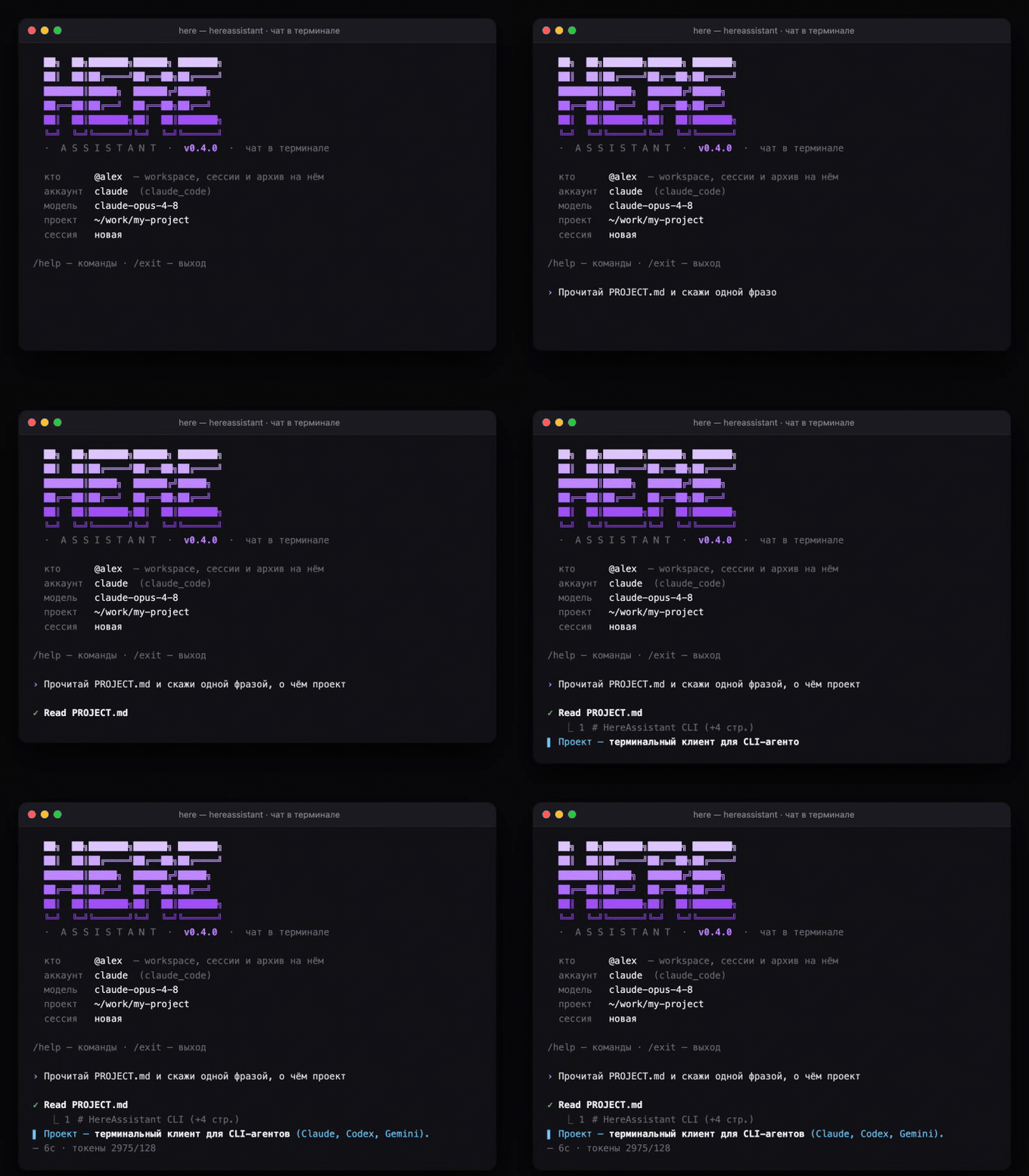
HereAssistant terminal chat — live demo

…or right in your terminal…или прямо в терминале

The same agents behind python chat.py — an interactive REPL like the native claude: reasoning, tool calls and the answer stream live, past sessions resume with /resume. Те же агенты за python chat.py — интерактивный REPL, как нативный claude: рассуждения, вызовы инструментов и ответ стримятся вживую, прошлые сессии — через /resume.
What's insideЧто внутри

Full agentic CLIs, not chat-completion APIs. Everything runs on your hardware, under your accounts. Полноценные агентные CLI, а не chat-API. Всё работает на твоём железе, под твоими аккаунтами.

🔀

Three providers, one chatТри провайдера, один чат

Claude Code, Codex and Gemini CLI as isolated subprocesses. Switch accounts and models with inline buttons mid-conversation. Claude Code, Codex и Gemini CLI как изолированные подпроцессы. Переключай аккаунты и модели инлайн-кнопками прямо в диалоге.

⌨️

Terminal chat, tooИ чат прямо в терминале

Not just Telegram — an interactive console REPL like the native claude: reasoning, tool calls and results stream live, past sessions resume with /resume. Same subscription accounts as the bot. Не только Telegram — интерактивный консольный REPL, как нативный claude: рассуждения, вызовы инструментов и результаты стримятся вживую, прошлые сессии — через /resume. На тех же аккаунтах, что и бот.

👥

Team access from the botКоманда — из самого бота

Newcomers file an access request; the owner approves with one tap (allow / admin / deny). Modes via /access, roles via /users — all in the DB, no .env edits or restarts. Новичок оставляет заявку — владелец подтверждает одной кнопкой (разрешить / админ / отклонить). Режимы через /access, роли через /users — всё в БД, без правок .env и рестартов.

🔐

Account isolationИзоляция аккаунтов

Each subscription lives in its own auth home. Several accounts of the same provider coexist without clobbering each other. Каждая подписка живёт в своём auth-каталоге. Несколько аккаунтов одного провайдера уживаются, не затирая друг друга.

📡

Live progressЖивой прогресс

Streaming progress message while the agent works: current tool, edited files, elapsed time. Interrupt by just sending a new message. Стриминг прогресса, пока агент работает: текущий инструмент, правки, время. Прерывание — просто новым сообщением.

🧠

Native sessions & shared memoryНативные сессии и общая память

Claude sessions resume natively; Gemini reads Claude's project memory. Context survives without storing your data. Сессии Claude продолжаются нативно; Gemini читает память Claude по проекту. Контекст живёт без сохранения твоих данных.

📊

Rich answersБогатые ответы

Final answers render with native tables, headings, code blocks and math (Bot API 10.1); the text streams as an animated draft. Automatic fallback to classic HTML. Итоговые ответы — с нативными таблицами, заголовками, кодом и формулами (Bot API 10.1); текст стримится анимированным черновиком. Авто-фолбэк на классический HTML.

🖥️

Web Mini AppWeb Mini App

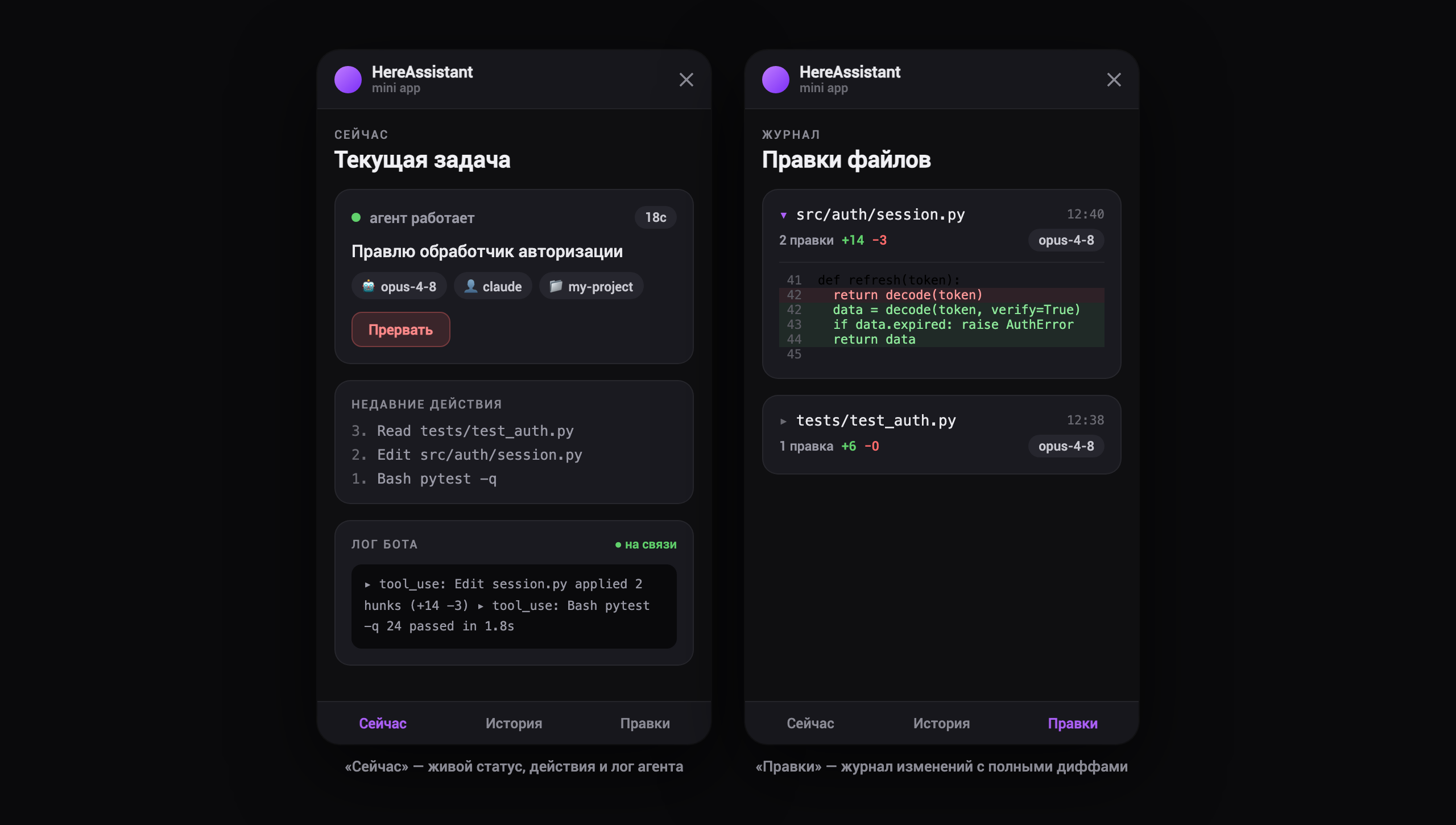
History, live status and a file-change journal with full diffs — right inside Telegram or in the browser. История, живой статус и журнал правок с полными диффами — прямо в Telegram или в браузере.

🎙️

Files & voiceФайлы и голос

Send documents, photos and voice notes; speech is transcribed locally with faster-whisper. Long answers come back as Markdown files. Отправляй документы, фото и войсы; речь распознаётся локально через faster-whisper. Длинные ответы приходят Markdown-файлами.

Follow along in a web Mini AppСледи за работой в веб Mini App

A Nuxt 3 Mini App inside Telegram or the browser: live task status and a per-file journal of every change with full diffs — authenticated via Telegram initData. Nuxt 3 Mini App прямо в Telegram или в браузере: живой статус задачи и журнал изменений по файлам с полными диффами — вход через Telegram initData.

HereAssistant web Mini App — live status and file-change journal

Private by default. Really.Private по умолчанию. По-настоящему.

No config file — no storage, no sync. Prompts, results and diffs are never written or sent anywhere. Relaxing this requires an explicit per-project file; even the service API token cannot see private projects. Нет конфиг-файла — нет хранения и синка. Промпты, ответы и диффы никуда не пишутся и не отправляются. Ослабить это можно только явным файлом в конкретном проекте; даже сервисный API-токен не видит приватные проекты.

default

private

Nothing stored, nothing synced. Only anonymous metrics: tokens, duration, counters. Ничего не хранится, ничего не синкается. Только обезличенные метрики: токены, длительность, счётчики.

opt-in

local

History stored locally if you say so. External systems can never see it. История хранится локально, если ты так решил. Внешние системы её не видят никогда.

opt-in

crm

Explicit integration: each data type (commits, deploys, diffs…) goes out only under its own flag. Явная интеграция: каждый тип данных (коммиты, деплои, диффы…) уходит только под своим флагом.

# <project>/.hereassistant/project.yml — the only way to open a project up
mode: "crm"
crm_project_id: "my-project"
sync:
  enabled: true
  send_commits: true   # metadata — yes
  send_prompts: false  # content — no
  send_diffs: false

Quick startБыстрый старт

Ubuntu, no Docker: PM2 keeps the bot and API alive, nginx serves the static Mini App. Ubuntu, без Docker: PM2 держит бота и API, nginx отдаёт статику Mini App.

git clone https://github.com/Creative-Agency-Here/HereAssistant.git && cd HereAssistant
bash scripts/bootstrap_ubuntu.sh          # venv + deps + frontend build + .env
# fill .env, log in your CLI providers, then:
pm2 start ecosystem.config.js --only here-assistant-bot,here-assistant-api

On first run the console prints a one-time claim code — the first person to send it becomes the owner; teammates then just message the bot. The whole path (BotFather → claim → roles) is in the onboarding guide. Full runbook with nginx and HTTPS: docs/ubuntu-pm2-nginx.md. Read SECURITY.md first — this is a remote-code-execution gateway by design. При первом запуске консоль печатает одноразовый claim-код — первый, кто его пришлёт, становится владельцем; дальше коллеги просто пишут боту. Весь путь (BotFather → claim → роли) — в гайде онбординга. Полный runbook с nginx и HTTPS: docs/ubuntu-pm2-nginx.md. Сначала прочитай SECURITY.md — это шлюз удалённого выполнения кода by design.